REA gives your coding agent tools to investigate how existing software works, follow the evidence and help you build a version of a feature in your own project. I find that pretty wild.
You know the situation: another app gets something exactly right. Search feels immediate. Copying a complicated document somehow preserves its formatting. An old game's movement still feels better than the prototype you built last week.
Usually, that becomes a vague ticket: “Make ours work something like this.”
REA, short for Reverse Engineer Anything, makes it practical to ask a more useful question: What happens between the input and the result, and which parts would I need to implement myself?
It connects coding agents such as Claude Code and Codex to software-analysis tools. Its repository showed roughly 96,000 stars when I checked on October 11, 2026, and it appeared first on GitHub's daily Trending page. Those are snapshots. The interesting part is what you can do with the workflow.
This guide covers installation, published REA case studies, ArtCraft's Adobe-related projects and practical starting points. I researched the documentation and inspected the linked source files; I did not run the featured app or game reconstructions myself.
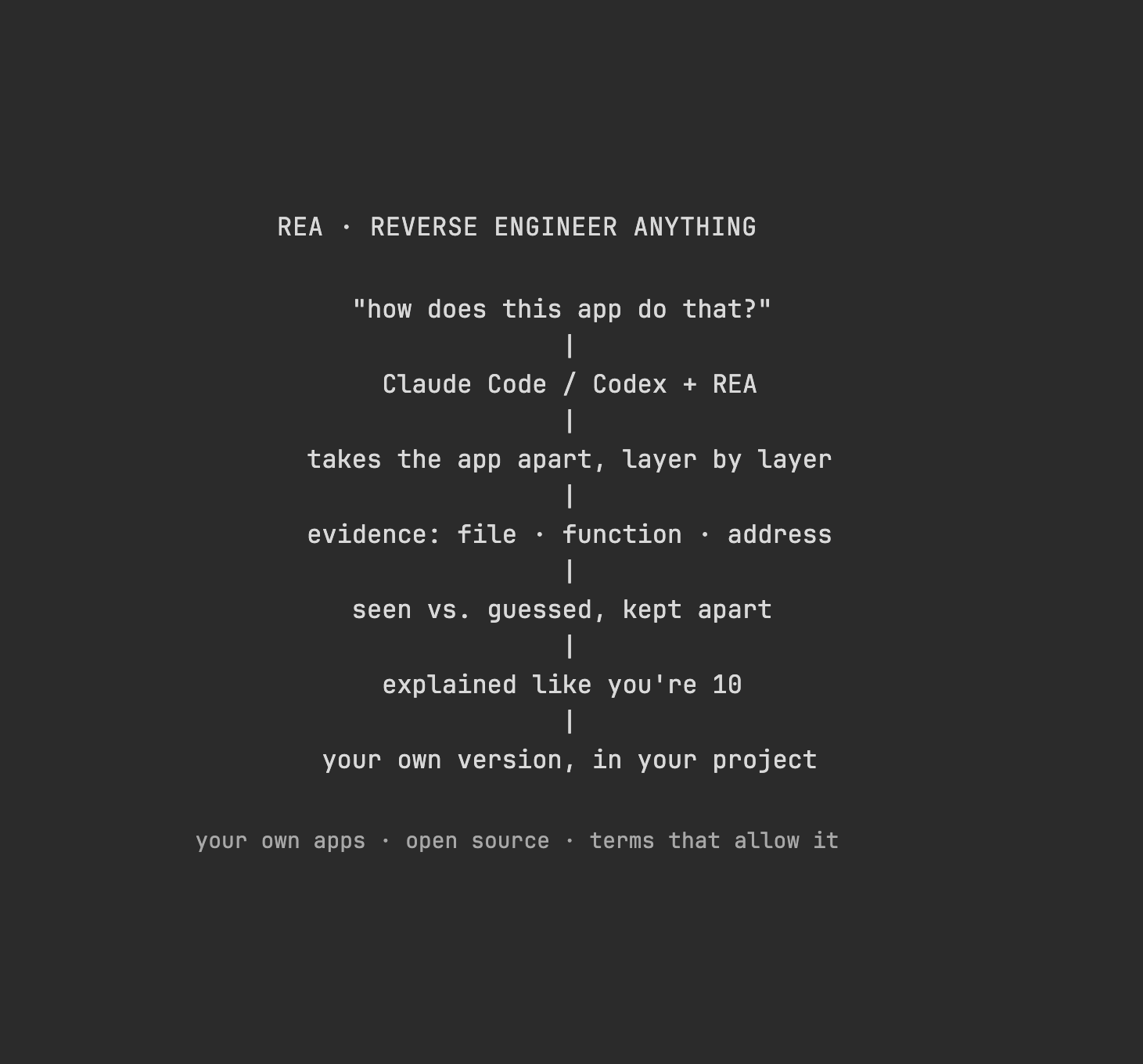
What REA adds to a coding agent
A finished application contains the result of many engineering decisions. Some remain visible in JavaScript bundles, file formats or network activity. Others sit inside compiled machine code.
The cake analogy works surprisingly well: source code is the recipe, compilation is baking, and the executable is the cake. Examining the cake can tell you a lot. It cannot reliably recover the baker's original notes, every ingredient's name or the exact order in which the recipe was written.
REA supplies two useful pieces:
- Tools, exposed through a command-line interface and MCP, which is the connection through which an agent calls external capabilities.
- Investigation instructions, which guide the agent through identifying a target, following relevant evidence and documenting what remains unresolved.
The CLI documentation explains how analysis results and evidence can be retained. The investigation prompts guide follow-up questions and verification.
That division matters. The model chooses what to investigate and explains its interpretation. The analysis tools provide something concrete to inspect. A convincing explanation still needs to survive a check against the target.
For me, the useful output is a small technical specification: inputs, outputs, transformations, dependencies and edge cases. Once that exists, I can decide how the feature should work in my own product.
Which software can it inspect?
Start by identifying the target. An Electron app, an Android package and a native Windows executable need different tools.
| Target | Useful evidence | What the workflow needs |
|---|---|---|
| JavaScript or Electron | Modules, imports, source locations and communication between processes | A supplied application directory or ASAR; static inspection needs no native decompiler |
| A website | Page structure, client scripts and observed browser/network activity | A supported Chrome-family browser and the selected target |
| Native application | Assembly, pseudocode, constants, callers and references | A compatible Hopper, Ghidra or IDA setup |
| .NET assembly | Metadata and intermediate-language instructions | REA's static managed-code workflow |
| Android APK | Manifest, classes, methods and references | The documented headless JADX setup and a full JDK |
The details are in the JavaScript guide, browser guide, native setup guide, managed-code guide and Android guide. Check the installed release's actual capabilities and host support.
A website deserves one extra distinction: observing its frontend and API responses does not reveal an unseen server implementation. You might establish that a request returns ranked search results. You still need separate evidence to explain how that ranking is calculated.
Install REA in Claude Code or Codex
1. Check Node.js
The current setup guide lists Node.js 22.19+ within the 22.x line, 24.11+ within 24.x, or 26+, together with npm. That is more specific than “any recent Node.”
node --version
npm --version
2. Run the installer
The project's short installation command is:
npx rea-agents setup
I would explicitly request the latest published package:
npx rea-agents@latest setup
Choose Claude Code, Codex or both. Review the proposed configuration changes and apply the relevant ones. Then restart the affected agent.
According to the installation documentation, setup registers the MCP server and installs matching instructions. Installing only the skill leaves the tool connection as a separate step. Also, npm's package-download confirmation and REA's configuration approval are different prompts.
3. Start with a target that needs few dependencies
Your own small JavaScript/Electron application is a useful first investigation. The documented static command accepts an application directory or ASAR without running the target:
npx -y rea-agents@latest analyze-javascript-application \
  "/absolute/path/to/your-app.asar" --json
Replace that path with your own file. The JavaScript workflow records source locations and unresolved relationships.
For native analysis, use the provider setup instructions. Ghidra and IDA use existing installations; Hopper can be proposed separately during setup. Their requirements and licenses remain separate from REA.
4. Check the connection if tools are missing
After restarting, the FAQ's diagnostic command for Codex is:
npx -y rea-agents@latest doctor --client codex --json
Use --client claude_code for Claude Code. A valid configuration still needs a working connection in the active agent session.
The release notes in the setup documentation distinguish repository main from the npm release. Follow the tools your connected server actually exposes. This workflow does not depend on choosing Opus 5.5; REA's client requirements are about local MCP support.
Example 1: Why Notion keeps formatting when you copy
REA's published Notion case study traces a clipboard operation in Notion Desktop 7.6.1 from tab_browser_view/preload.js to main/index.js. It follows the notion:clipboard:write channel to Electron's clipboard writer, including a sender check. The study also examines structured block data using separately cached web assets.
That is a much more useful finding than “Notion probably uses HTML.”
In general, a clipboard operation can provide multiple representations of the same content. A plain text editor uses the text. A rich editor may consume HTML. Electron's clipboard API explicitly supports writing text and HTML together.
Imagine copying a task list from your own app. You might want:
- Readable text when someone pastes into a terminal.
- Formatted content when someone pastes into an email.
- Your own structured task objects when someone pastes into another instance of your editor.
Those are three product requirements. They lead to different implementation and compatibility tests.
For an original version, I would define a plain-text representation, an HTML representation and, if needed, a versioned internal format. I would then test paste behavior in a few actual destination apps. In a desktop app, I would also verify which process is allowed to invoke the system clipboard.
The useful thing to carry into your project is the behavior you need and the constraints you discovered. You can choose a different internal design.
Example 2: Investigate instant search in your own app
Here is an illustrative investigation I would try with an older build of my own notes app.
The question is deliberately small:
After I type three letters, how does this app update the results, and what prevents an older search from replacing a newer one?
I would ask the agent to trace the input handler, any delay, the search call and the result update. Then I would test the important uncertainty:
| What I observe | Possible explanation | Check that would distinguish it |
|---|---|---|
| No network request while typing | Search may use local data | Inspect the search call and test with networking disabled |
| Results appear after a brief pause | Input may be debounced | Compare handler timing across controlled typing sequences |
| Fast typing never shows stale results | Requests may be cancelled or results rejected by sequence | Deliberately complete two searches in the opposite order |
These are hypotheses, not findings about a particular commercial notes app. A cache, worker or preloaded dataset could change the explanation.
For my own implementation, the minimum pieces might be an input handler, a search function, a result list and a rule that rejects obsolete results. A worker or a more complicated index only becomes worthwhile if measurements justify it.
My acceptance check would be concrete: start query A, start query B, let B finish first, then finish A. The screen should still show B. That test tells me more about correctness than an agent saying the architecture looks modern.
Example 3: ArtCraft and the Adobe-related Crafting Apps
The ArtCraft application directory is a fascinating example of the broader interest in rebuilding familiar creative workflows. It currently lists twelve native Rust applications.
There are two different things to look at:
- storytold/artcraft is an AI image and video creation studio, with 2D composition and 3D staging.
- The Crafting Apps are separate projects. Several explicitly describe themselves as clean-room reimplementations of Adobe software.
Some examples from their own repositories:
| Project | Familiar workflow it targets |
|---|---|
| PhotoCraft | Photoshop-style image editing |
| FilmCraft | Premiere Pro-style video editing |
| LightCraft | Lightroom-style photography workflows |
| PdfCraft | Acrobat-style PDF work |
“Clean-room” is the maintainers' description of their development approach. I found no primary evidence that REA built these projects, so I treat them as related examples of reimplementation.
The open-source aspect is a big part of why this interests me. ArtCraft and PhotoCraft offer their code under MIT or Apache-2.0, with separate notices for third-party material. You can inspect the implementation and the tests behind a feature claim.
PhotoCraft shows what “compatible” needs to mean
PhotoCraft says its PSD implementation starts from public specifications and observed behavior. Adobe publishes the Photoshop File Formats Specification, which gives third parties a documented starting point for reading and writing PSD/PSB files.
But being able to read a file is only the beginning.
I looked at three separate tests in PhotoCraft's repository:
| Test | The question it asks |
|---|---|
| PSD corpus | Can the parser read a fixture and write back identical bytes? |
| Import/export corpus | Does imported rendering match a stored reference, and does export/reimport preserve the app's rendering? |
| Rendering oracles | After removing cached text and smart-object pixels, can its own engines recreate the expected image? |
That last distinction is particularly good. A saved file can contain a ready-made picture of an effect. Showing that picture is easier than computing the effect after somebody edits its inputs.
Here is how I would turn that into a small project of my own: support a document with two raster layers, one mask and one blend mode. Define the supported subset. Create fixtures whose redistribution is permitted. Check that the parser preserves their information, the renderer produces the expected pixels, and a changed layer survives saving and reopening.
That gives me a feature I can assess. A familiar toolbar by itself tells me very little about what happens when someone changes a document.
PhotoCraft's README still calls the application early alpha and warns against treating it as a daily professional Photoshop replacement. I find the direction impressive; practical readiness needs its own evidence.
Example 4: Yes, people are doing this with games
I already wrote about AI game modding and reverse engineering, including the idea of putting an unexpected mechanic into a familiar game world. REA adds useful examples where you can inspect a much narrower technical claim.
A sound calculation in DX-Ball
The official DX-Ball showcase follows a sound-pan helper at 0x00406400. The published reconstruction reports 3,205 comparisons against the original x86 function and 63 matching compiled bytes with a pinned historical compiler.
The scope is one calculation. It is a strong example because the explanation is tied to instructions, callers, constants and checks.
For an original game, the design question might simply be: how should a sound move between the left and right speakers as an object moves across the screen? Recovering the old function can explain the old game's behavior. Your own audio engine may need a different range or a different panning curve.
A ring of bullets in TH04
REA's TH04 case study inspects bullet_velocity_and_angle_set() in a DOS executable. It traces an evenly spaced ring and the added direction toward the player. The original represents a turn with 256 angle units.
For teaching the general idea in a new game, ordinary radians are easier. This is my own simplified example, not the recovered TH04 implementation:
function makeBulletRing(count, speed, rotation = 0) {
  if (!Number.isInteger(count) || count < 1) {
    throw new RangeError("count must be a positive integer");
  }

  return Array.from({ length: count }, (_, index) => {
    const angle = rotation + (2 * Math.PI * index) / count;
    return {
      vx: Math.cos(angle) * speed,
      vy: Math.sin(angle) * speed,
    };
  });
}

const velocities = makeBulletRing(16, 120);
Each bullet receives a direction. Sixteen bullets divide a full turn into sixteen equal pieces. The speed sets how quickly they move; the rotation turns the whole pattern.
For screen coordinates where positive Y points down, the same convention should be used for the target direction. An aimed pattern can use Math.atan2(playerY - originY, playerX - originX) as its rotation.
That is an approachable starting point. Reproducing the original game's feel would also require its timing, integer rounding, spawning rules and difficulty adjustments. Understanding the geometry solves one part of the problem.
Recompilation, decompilation, emulation and modding
A video of an old game running on a new platform does not tell you which technique produced it.
| Term | What it describes |
|---|---|
| Decompilation | Recovering a source representation from a compiled program, with analysis needed to understand it |
| Static recompilation | Translating compiled instructions ahead of execution into code for another build/runtime |
| Emulation | Reproducing the behavior of an execution environment, potentially using several execution techniques |
| Modding | Changing a game's behavior or content; the underlying method can vary |
N64Recomp documents instruction-by-instruction translation to C with supporting metadata and a runtime. zeldaret/oot is a source reconstruction project. QEMU's documentation explains the separate execution-environment approach. These terms describe different goals and layers; real projects can combine techniques.
Zelda64Recomp is a concrete static-recompilation example. Its releases exclude game assets and require the original game. Its maintainers also explicitly reject generative AI in development, so it should be understood as an example of the technique, not as an AI or REA showcase.
For educational context, here is the supplied Chun's Ready-to-Go Recomp Games collection. I could not verify its current entries or the permissions for individual uploads. The link illustrates the surrounding interest; it is not evidence that those items were created with REA or are authorized to redistribute.
Example 5: Recover the rules in your own legacy tool
The less flashy use case may be the most valuable.
Imagine your company still depends on an old utility that converts supplier files into invoice imports. The source code is gone. It still runs, but nobody can explain why one file works and another fails.
A useful investigation question would be:
In this utility we own, what rules determine whether a CSV row is accepted, and how are its date and amount converted?
I would prepare a few synthetic inputs: an empty field, a decimal comma, a quoted separator, an invalid date and a duplicate invoice ID. Where execution is approved, run copies in an isolated test environment and capture the outputs. Then ask the agent to trace the relevant parsing and conversion paths.
The deliverable should describe the input format, conversion rules, rejection cases and unresolved behavior. That is enough to start discussing a replacement with the people who depend on it.
I would also ask whether each odd behavior needs to survive. If the original silently drops invalid rows, reproducing that mistake might preserve compatibility while keeping a serious operational problem. A documented migration decision is better than copying every quirk automatically.
The prompt I would use
Start with one feature and a small target. This prompt keeps the investigation focused and makes the handoff into implementation explicit:
I want to use REA to understand one software feature and plan an
original implementation for my own project.

1. Ask me for the app or repository, its version or local path, the
   exact feature, and a small example of the behavior I care about.
   Ask me to confirm the basis for inspecting it: software I own,
   an applicable open-source license, or explicit authorization.
   If that is unclear, pause the target analysis.

2. Identify the target type and the capabilities available in this
   REA installation. Start with the smallest useful static analysis.
   If an external tool is missing, name it, explain why it is needed
   and link its official installation instructions. Do not install
   tools or change my agent configuration automatically.

3. Trace the feature from input to output. For each important finding,
   include the file and source location, or function and address,
   plus the target version or artifact identity. Separate observed
   facts, inferences and unknowns. Do not invent recovered source.

4. Explain the result in plain language. Give me a short technical
   specification: inputs, outputs, state, dependencies and edge cases.
   Propose the smallest check that could disprove each uncertain claim.
   Ask before launching the target or capturing runtime/network data.

5. Propose the minimum components for my own implementation, using
   original code and material I have permission to use. Include a few
   acceptance checks and unresolved compatibility decisions.
   Show me the plan and wait for my approval before writing product code.
The point is to get a question you can answer. “Rebuild this entire professional application” makes it much harder to know whether the agent has understood anything correctly.
Open source, privacy and the limits that matter
REA itself is MIT-licensed. That lets you inspect and adapt the tool while respecting its notices. It does not change the license of the software being analyzed. This is the kind of inspectable tooling I argued for in why code should be free.
“Local analysis” also needs a precise meaning. REA runs its analysis locally, but the coding agent receives the results. Its model provider's data policy still applies, as the REA FAQ explains. With an internal company application, check whether code excerpts, strings, paths or captured data may be sent to that provider. Model usage and commercial analysis tools can also have their own costs.
For any project, establish the relevant rights and terms before examining or sharing its material. “Educational purposes only” does not itself establish a license or permission to redistribute software, game data or assets. A published case study describes an investigation; it does not grant permission for every reader to repeat it.
My first experiment would be a feature in a small app I own or an appropriately licensed open-source project. That keeps the target understandable and the result easy to check.
What excites me is the possibility of turning “I wonder how they did that” into an explanation I can inspect, challenge and use. A good result gives me a clearer starting point for building my own idea. That is already a pretty big deal.
Sources and repository files were reviewed on October 11, 2026. Published case-study results belong to the linked projects. The search exercise, legacy-tool workflow, bullet-ring snippet and starter prompt are illustrative examples for this article.