My pick for creative, AI-assisted video production is Claude Opus 5.5. Its strongest advantage is not that it writes better FFmpeg commands. It is the ability to think through a story: what to show, in which order, why an animation should exist and how one shot sets up the next.
My pick for economical code execution is GPT-6.1 Sol. It costs half as much at standard API token rates in ordinary-context workloads, and a published 48-task benchmark finds it stronger at reconstructing existing web animations. These claims are not contradictory: conceiving an original video and accurately copying existing motion are different tasks. 1235
And if I were building a real, repeatable video pipeline, I would not force one model to handle everything. I would have Opus design the video, Sol implement it, and Opus review the render.
Scope matters: This comparison is about AI-assisted creative editing, code-driven motion graphics, and automated video assembly. It is not a controlled benchmark of editing raw footage in Premiere Pro, DaVinci Resolve or Final Cut Pro, nor a comparison of text-to-video generators. The public evidence is still limited.
For more context, see my articles on Claude Opus 5.5 and AI motion design.
The verdict by category
| Task | Practical winner | Why / evidence |
|---|---|---|
| Creative direction and narrative structure | Claude Opus 5.5 (provisional) | Stronger storyboards in a small studio experiment; concept preferred for one social teaser. 34 |
| Original motion-graphics concepts | Opus 5.5, with caveats | Better conceptual transformation in some examples, not a universal win. 34 |
| Transitions and visual pacing across a story | Opus 5.5 (provisional) | BreadStudio reports a full-video narrative advantage, not proof of superior individual shots. 3 |
| Recreating existing web animations | GPT-6.1 Sol | 0.606 vs 0.507 on Physera's 48-task reproduction score. 5 |
| Remotion / React implementation | Both | Both delivered working Remotion films and accurate constrained revisions in one direct test. 4 |
| FFmpeg, automation, render orchestration | Task-dependent | Both can write tool-driven workflows; there is no robust head-to-head video-editing benchmark here. |
| Standard API price | GPT-6.1 Sol | $2/$10 vs $4/$20 per million input/output tokens. 12 |
| End-to-end generation speed | Unproven | Rendering hardware, workflow, effort mode and retries change the result; token price does not measure elapsed time. |
| Overall creative video production | Claude Opus 5.5, tentatively | The stronger choice when story and art direction matter more than unit cost. |
The word provisional is important. A useful editorial preference is not the same thing as a scientific ranking.
1. The interesting difference: editing code versus directing a story
A model can generate valid React components, correctly encode an MP4, and still produce a forgettable video. That is because technical correctness does not solve the hard creative questions: What should the viewer understand after the first three seconds? What visual change creates a payoff? When should the screen be quiet?
This is where the October 7 BreadStudio field report on Hugging Face becomes useful. The team divided production into two layers: first a shot-by-shot creative blueprint with script, visuals, animation and sound design; then coding and rendering. For three completed episodes, the studio used Opus 5.5 for the blueprint and GPT-6.1 for the implementation. 3
Example A: The sunflower that explains the idea
For an episode about phyllotaxis—the mathematical patterns behind plant growth—the team tried giving GPT-6.1 the full ten-step workflow. The output was technically complete but, in the team's assessment, narratively flat.
The decisive comparison was the opening:
- GPT-6.1 as designer: dots progressively assemble into a sunflower head.
- Opus 5.5 as designer: a seedling grows into the light; the camera rises; the arrangement of leaves becomes a transition into the sunflower's seed pattern.
Crucially, GPT-6.1 coded both versions. The difference was the plan, not the rendering model. Opus had added a visual metaphor that was absent from the topic brief. 3
That is the distinction I care about. Motion for its own sake is decoration. Motion that makes a concept understandable is direction.
Watch/read: BreadStudio's original production comparison.
What the same experiment does not prove
BreadStudio also asked two experienced video professionals to compare short clips without knowing the designer. Both chose the GPT-6.1-designed version of one clip; in the other comparison, one preferred Opus and the second considered them approximately equal. The sample was just two reviewers and a few excerpts. 3
So the sensible conclusion is narrower than “Opus wins every animation.” Opus may be better at shaping the narrative of a complete piece even when Sol can design a compelling isolated shot. That is a hypothesis supported by a useful production case, not a settled industry benchmark.
2. An independent result that favors GPT-6.1 Sol
A serious comparison should include evidence against its own preferred winner.
Physera's Animation Bench, updated October 1, tested 48 animations from 32 real websites. Agents received sampled frames and network captures, then had to reconstruct each animation as a self-contained HTML file. The artifacts were replayed in a browser and compared with the references on visual similarity, motion consistency and layout. One selected run per model and task was reported. 5
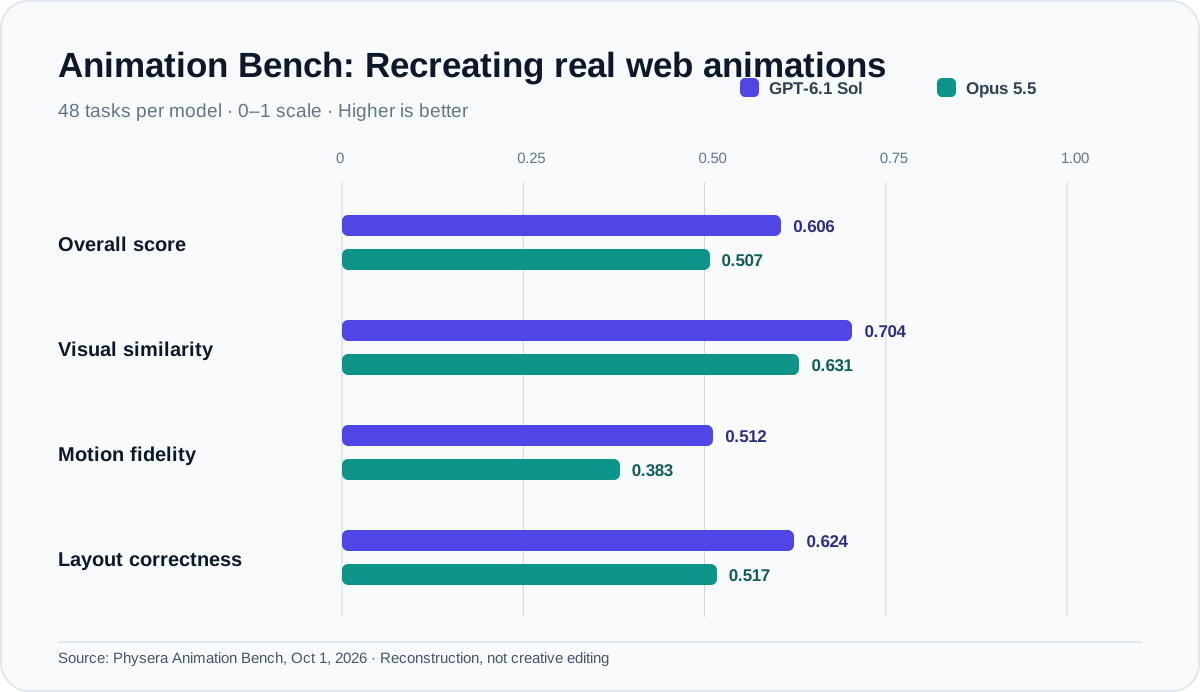
| Published metric (0–1; higher is better) | GPT-6.1 Sol | Opus 5.5 |
|---|---|---|
| Overall reproduction score | 0.606 | 0.507 |
| Visual similarity | 0.704 | 0.631 |
| Motion consistency | 0.512 | 0.383 |
| Layout correctness | 0.624 | 0.517 |
| Average reported model cost/task | $0.46 | $1.12 |
Sol leads on each reported axis in this benchmark. That matters if your job is: “Rebuild this existing landing-page animation accurately.” The score measures fidelity to a reference, not originality, narrative quality or editing real footage. GPT-6.1 was also added in a later scoring run, so minor differences in recording conditions are a caveat. 5
What this changes: I would not give Opus an unconditional “motion graphics winner” label. For creative direction, Opus has promising evidence. For faithful motion reconstruction, Sol has a more substantial result.
3. Same Remotion brief: both deliver, but in different ways
A more directly comparable video experiment comes from Voyager's October 1 head-to-head. Both models received the same creative brief: a 15-second, 1280 × 720, 30 fps teaser for a fictional maker event called OFFLINE, produced as editable React/SVG/CSS in Remotion. Both were tested at high effort with the same starter and fonts. 4
Example B: Concept versus brand continuity
Opus 5.5: an orange line becomes an idea scribble, then a paper plane, then contributes to the final timetable graphic. The film carries a visual story about turning an idea into something real. The trade-off: the event name disappears after the beginning, and some letter-by-letter motion takes too long.
GPT-6.1 Sol: a folded paper ribbon evolves through several coherent shapes; the event identity stays visible, and text has comfortable holds. The trade-off: the compositional pattern becomes repetitive.
Voyager preferred Opus for a social teaser and Sol for a website hero. That is a task-specific choice, not a universal winner. 4
The revision test is just as interesting. Both models changed the event hours, inserted an extra line and preserved the first 270 frames (nine seconds) pixel-for-pixel. Both also rendered the newly inserted line too small for comfortable mobile reading. 4
This illustrates a production rule: a technically correct revision can still fail visual QA.
Watch and download the actual films and source: Voyager's side-by-side comparison.
Example C: Blender renders are not model-speed benchmarks
Nowrap compared two 30-second Blender animations created from the same clockwork brief. Opus favored extreme cinematic macro framing and shallow focus; Sol showed more of the mechanism with stronger object readability. Reported render times were roughly 12 hours and 7.5 hours, respectively—but both jobs shared one GPU and produced scenes of different complexity. 6
Those times cannot establish that one language model is faster. They mostly measure how expensive the resulting scenes were to render under those conditions. Judge this example by your intended visual style, not by a misleading “speed winner.”
4. Cost: GPT-6.1 Sol has a clear structural advantage
On their standard API schedules, the two models are easy to compare: OpenAI lists GPT-6.1 Sol at $2 input, $10 output and $0.10 cached input per million tokens. Anthropic lists Opus 5.5 at $4, $20 and $0.20. 12
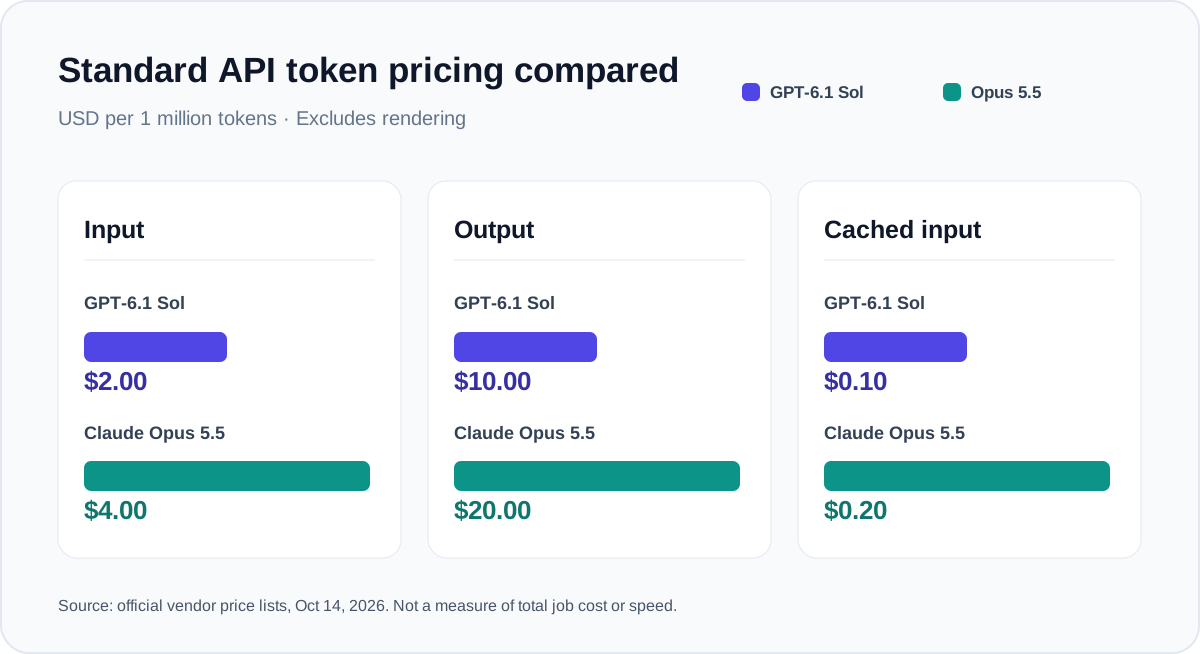
For an illustrative pass that consumes 100,000 input and 20,000 output tokens at published standard rates, the nominal API bill is:
- GPT-6.1 Sol: $0.40 ($0.20 input + $0.20 output).
- Claude Opus 5.5: $0.80 ($0.40 input + $0.40 output).
Real invoices depend on model-specific tokenization, caching, reasoning, retries, pricing tiers and workload size. OpenAI also applies long-context surcharges above its published threshold, so “half price” is not a universal statement for enormous prompts. These are model-token costs, not GPU/video-render costs. 12
For occasional flagship work, that difference may be irrelevant. For 500 automated videos per day, it can become a fundamental architecture decision—provided output quality and retry rates remain acceptable.
5. The production pipeline I would actually use
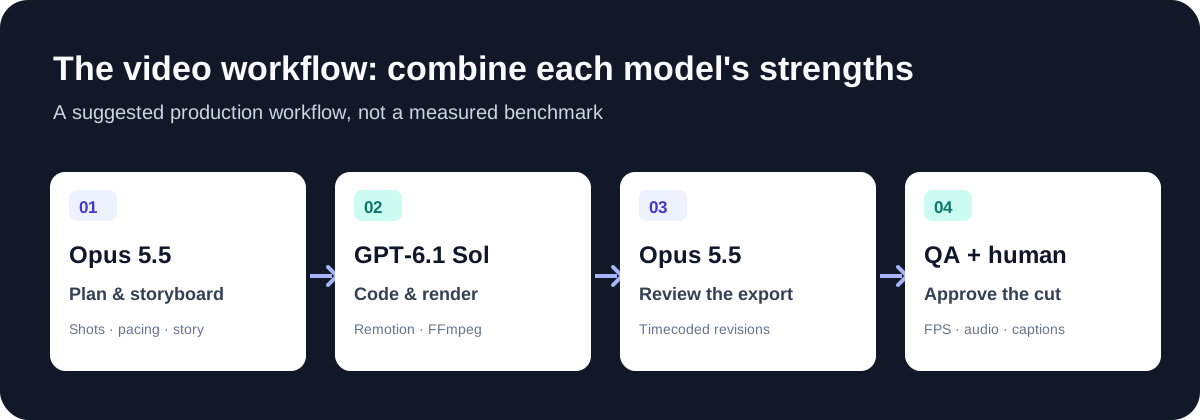
Step 1 — Opus 5.5: Creative direction. Produce a structured plan: audience, single key message, opening hook, shot list, on-screen copy, rhythm, transitions, sound cues and brand rules. Specify exactly when each shot starts and ends. Do not start coding before the narrative makes sense.
Step 2 — GPT-6.1 Sol: Implementation. Convert the approved plan into a deterministic Remotion composition. Use FFmpeg for media operations such as trimming, concatenation, mixing and encoding when appropriate; use Python for batch preprocessing and validation. Preserve editable source, assets and render commands. Remotion supports compositions with explicit frame counts, dimensions and FPS. 7
Step 3 — Opus 5.5: Editorial review. Review the exported video, or sampled frames plus timestamps and the script if direct video inspection is unavailable. Identify weak transitions, redundant movement, rushed reading time and unclear visual metaphors. Return concrete frame- or time-based revisions—not a vague request to “make it better.”
Step 4 — Automated and human QA. Check export dimensions, duration, FPS, media integrity, typography, mobile legibility, caption timing, safe areas, loudness, missing assets and whether approved frames changed unexpectedly. A human still approves the final cut.
A usable brief: 15-second product launch teaser
Here is a hypothetical production example, not another experimental result:
| Time | Visual beat | Creative purpose |
|---|---|---|
| 0–3 s | A messy terminal fills with repeated errors; one word cuts through. | Hook and recognizable problem. |
| 3–7 s | Errors collapse into a single clean dashboard state. | Transformation; show the solution. |
| 7–11 s | A graph grows from the actual interface, not as an unrelated visual. | Demonstrate impact while maintaining continuity. |
| 11–15 s | Interface settles, product name and one clear CTA remain readable. | Brand recall and conversion. |
I would first ask Opus to justify each transition: Why does this shot follow that one? What does the viewer learn? Once that is approved, implementation is a comparatively mechanical job.
Copyable prompt: Opus 5.5 as creative director
Act as a senior motion designer and film editor. Design a 15-second,
30fps product-launch video for [PRODUCT] targeting [AUDIENCE].
Goal: [ONE MESSAGE]. Brand: [COLORS/FONTS/VOICE].

Deliver a timecoded storyboard covering every second: shot intent,
exact on-screen copy, camera/shape movement, transitions, easing,
sound cues, readability time, and safe areas. Use one evolving visual
motif. Prioritize narrative clarity over decorative effects.
Do not write code yet. Flag assumptions and weak beats.
Copyable prompt: GPT-6.1 Sol as implementation engineer
Implement the APPROVED storyboard below in Remotion with React and
TypeScript. Output: 1920x1080, 30fps, exactly 450 frames (15 seconds).
Use frame-accurate timing and deterministic animations. Preserve all
approved copy, shot boundaries, visual hierarchy, and brand assets.
Use licensed/local assets only. Include editable source, render
command, and an MP4. Do not redesign the storyboard.
Run the render; verify duration, frame rate, dimensions, and missing
assets. Report any deviations before proposing fixes.

[PASTE APPROVED STORYBOARD]
Copyable prompt: Opus 5.5 as final reviewer
Review this rendered video against the approved storyboard.
Use the video directly if available; otherwise review sampled frames,
timestamps, transcript, and a list of transitions.
Report only actionable issues, each with a timecode, severity,
reason, and exact requested fix. Check storytelling, pacing,
transition continuity, captions, brand visibility, mobile legibility,
and unnecessary visual motion. Preserve what already works.
6. What a genuinely fair video-editing benchmark would require
I would not call the model battle “settled” until both have been tested across multiple complete editing jobs: promotional teasers, explainers, product demos, real-footage highlight edits and motion-graphics recreations. A useful protocol would use identical assets and briefs, matched tool access and reasoning budgets, multiple runs per task, and blind reviewers who watch the full video, not only the prettiest ten seconds.
Judge each submission on narrative comprehension, aesthetics, timing, brand compliance, editability, revision accuracy, mobile readability, total production time and end-to-end cost—including failures and rerenders. Publish every artifact, not just the best example. Most available reports are narrower than that.
Final verdict
Choose Claude Opus 5.5 if your bottleneck is the creative idea: storyboard, storytelling, intentional transitions and the visual logic of a finished film. The small available production studies make it my provisional single-model pick for creative video work. 34
Choose GPT-6.1 Sol if your bottleneck is repeatable implementation, API cost or faithfully recreating existing interface animations. Its pricing advantage is documented and Physera's reproduction benchmark directly favors it. 125
Choose both if you want an automated video factory that still looks directed. Opus decides what the video should say. Sol builds it. Opus critiques it. Your QA decides whether it ships.
Sources and methodology
- Anthropic — Introducing Claude Opus 5.5 (September 22, 2026). Official model/API rates and claims.
- OpenAI — Introducing GPT-6.1 Sol (September 29, 2026). Official rates, capabilities and limitations.
- BreadStudio / Hugging Face — Where Is Opus 5.5 Strong in Making Video? (October 7, 2026). Small-studio case study and limited blind review; not a peer-reviewed benchmark.
- Voyager — GPT-6.1 Sol vs Claude Opus 5.5 for Remotion animation (October 1, 2026). Matched teaser brief, both revisions and downloadable original artifacts.
- Physera — Animation Bench (updated October 1, 2026). 48 web-animation recreation tasks per model; not a video-editing or creative-direction test.
- Nowrap — Same Blender prompt, two animations (October 2, 2026). Side-by-side scenes; confounded rendering times.
- Remotion documentation — Compositions. Frame-based React video output.
Disclosure: This is a synthesis of published reports, hands-on demonstrations and official documentation, not a claim that I independently reran all model comparisons. Editorial winner selections are judgments, not invented benchmark scores. Chart values reproduce source figures; the diagrams explain a proposed workflow.