Audio in. MIDI out. Locally. No cloud uploads. No credits per transcription.
I like AI when it removes the boring parts of music production, not when it takes over the creative decisions. Rebuilding notes from a recording is a perfect example. I want to get the notes into FL Studio, change the sound, rewrite the arrangement and keep making music.
That's why I built Audio2MIDI with awesomeAE: a free, open-source audio-to-MIDI plugin that processes recordings on your own computer.
The first release is available as VST3 and Audio Unit (AU) on macOS. The repository also includes a standalone build target and Windows source code, although the Windows version is not properly tested yet.
Why I wanted a local alternative
Mirelo's Audio-to-MIDI plugin already shows how useful this workflow can be: insert a plugin, transcribe a recording, then drag the detected notes back into your DAW.
But Mirelo's plugin sends the audio to its servers and uses account credits for transcription. I wanted that same kind of workflow without making every take depend on a hosted service.
Audio2MIDI runs inference on your machine. It uses MuScriptor, the published multi-instrument research model developed by Kyutai and Mirelo. It does not use Mirelo's newer proprietary production model. These are different systems; I am not claiming identical output or better accuracy.
Audio2MIDI is independent and is not affiliated with Kyutai or Mirelo.
Full mixes in, editable notes out
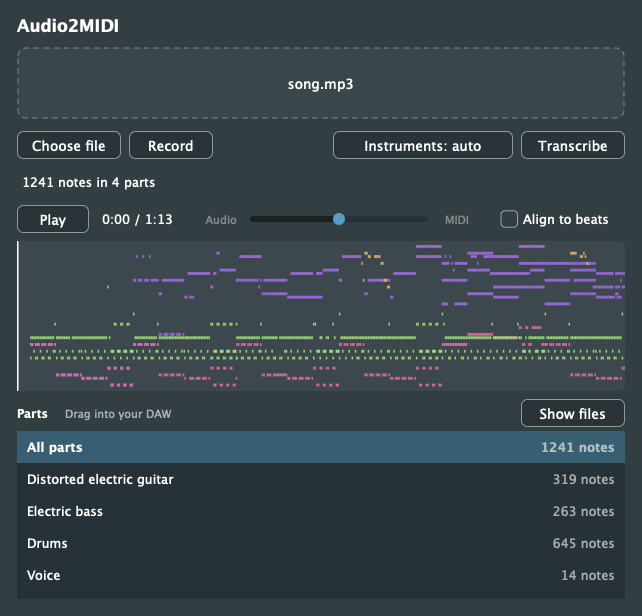
Drop in an MP3, WAV, FLAC, AIFF or OGG, choose a file, or record audio from the track. Audio2MIDI can attempt to transcribe multiple instruments from an entire mix, not just a solo performance.
You get an All parts MIDI file and individual MIDI files for detected instrument groups. That means you can take the bass notes from a track, put them on your own synth, rebuild the drums or try another harmony.
Be precise about what this means: MIDI transcription is not audio stem separation. The plugin predicts notes and instrument categories. It does not recover original isolated recordings.
What you can do in the plugin:
- Transcribe multi-instrument audio without manually separating stems first.
- Let the model detect instruments or narrow the requested groups.
- Inspect the piano roll before exporting anything.
- Preview MIDI against the source audio using macOS's built-in General MIDI sounds.
- Align notes to detected beats, or preserve expressive timing.
- Drag individual parts or everything into your DAW. The MIDI files retain tempo and meter.
- Reopen the project with completed transcription data preserved.
It's a small, focused tool. It turns audio into something I can actually edit.
My FL Studio workflow
- Put Audio2MIDI on an audio track.
- Drop in a recording or press Record while the track plays.
- Leave Instruments on Auto or select the groups you expect.
- Click Transcribe, then inspect the piano roll and audition the individual parts.
- Enable Align to beats if you want grid-aligned notes. Drag the MIDI into the DAW and give it your own instruments.
For a tightly programmed electronic arrangement, the beat grid can save time. For an expressive melody, I'd listen to the unaligned notes first. Quantizing everything automatically can remove what made the performance interesting.
The preview is for checking note recognition. Apple's General MIDI sounds are not a replacement for the instruments and effects you will choose in the final production.
How it works: JUCE, Python and a local model
The plugin is written in C++20 using JUCE 9. MuScriptor is a PyTorch transformer, so the model runs as a separate Python process rather than being embedded inside the VST3.
DAW (VST3 / AU)
      |
      v
Audio2MIDI (JUCE / C++)
      |
      | HTTP: 127.0.0.1:8722
      v
MuScriptor 0.4.0 (Python / PyTorch)
      |
      v
MIDI tracks by instrument
On the first transcription, Audio2MIDI uses uv to prepare an isolated Python 3.12 environment and launch the engine. Once you have accepted the model terms, its weights are downloaded from Hugging Face. Multiple plugin instances reuse the same local engine, and the plugin shuts down the process it started when the last instance closes.
The audio is submitted to a service bound to 127.0.0.1, not to an Audio2MIDI cloud API. After initial setup, the inference itself happens locally.
There is still a first-run download and a real software dependency. Local processing isn't the same as zero setup.
Installation on macOS
The v0.2.0 release includes a universal macOS installer for Apple Silicon and Intel, supporting macOS 11 and later.
- Install uv.
- Create a free Hugging Face account and accept the MuScriptor Medium model terms.
- Authenticate once:
uvx hf auth login
- Download Audio2MIDI-macOS.pkg from the latest release. Install, then rescan your DAW's plugins.
- Open Audio2MIDI and transcribe a file. The initial Python/PyTorch and model download requires roughly 2 GB of space according to the project README.
Current binaries are unsigned and not notarized. macOS may block the installer. You can explicitly allow it under System Settings → Privacy & Security → Open Anyway, but only if you trust the release and have verified its source and published checksum. The package installs VST3 and AU in your user Library without requiring an administrator password; a ZIP is available for manual installation.
Audio2MIDI vs. Mirelo's Audio-to-MIDI plugin
| Audio2MIDI | Mirelo Audio-to-MIDI | |
|---|---|---|
| Where transcription runs | On your computer | On Mirelo's servers |
| Model | Published MuScriptor research model | Separate proprietary production model |
| Per-use credits | No | Yes |
| Initial account | Free Hugging Face account for gated weights | Mirelo account |
| Released binaries | macOS VST3 / AU | macOS and Windows |
| Licensing | AGPL-3.0 plugin; CC BY-NC 4.0 model weights | Proprietary hosted product |
| DAW handoff | Individual and combined MIDI files | Individual and combined MIDI files |
Sources: Audio2MIDI, MuScriptor and Mirelo's plugin announcement. Details checked November 9, 2026. I have not independently benchmarked the two models for quality or speed.
Mirelo's managed workflow is simpler if you don't want to install a local model. Audio2MIDI gives you control over where the computation happens and avoids paying credits for each transcription. Neither trade-off automatically makes one model more accurate.
What it cannot do (yet)
Transcription is not magic. Distorted guitars, dense arrangements, effects, unusual instruments and inconsistent timing can confuse a note recognition model. Expect to fix notes manually.
The MuScriptor Medium model card explicitly notes that velocity is not predicted, note offsets can be inaccurate and some genres or underrepresented instruments work less reliably. Use the MIDI as an editable starting point, not a perfect score.
Other limitations in this release:
- Windows: builds from source, but remains untested. Inference currently runs on the CPU, MIDI preview is silent and no Windows installer is published in v0.2.0.
- Pro Tools: no AAX format.
- Recorded audio: the finished MIDI transcription is restored with the project, but a temporary recorded take is not.
- Commercial usage: the plugin code is AGPL-3.0, while MuScriptor's downloaded weights are CC BY-NC 4.0 (non-commercial). The plugin being open source does not grant commercial rights to the weights. Review the model licence and use conditions before any commercial workflow. Only transcribe audio you have the necessary rights to use.
That last distinction is especially important to me: open code and model weights are separate layers with separate rights. Calling something open source shouldn't hide the conditions.
Keep the music yours
I don't want AI to make the melody, pick every sound or decide what a track should feel like. I want it to eliminate the repetitive parts so I can spend more time on the decisions that matter.
Audio2MIDI doesn't try to replace FL Studio or compose a song for me. It gives me editable MIDI. What I do with those notes is still my choice.
There's room to improve accuracy, compatibility and setup. That's exactly why I made the project public.
Get Audio2MIDI on GitHub, download the macOS release, inspect the code and contribute. I wrote more about the kind of creative control I want in Building a Personal AI Music Workspace.
Further reading: MuScriptor source, MuScriptor research paper, MuScriptor Medium licence and limitations and Mirelo's VST3/AU documentation. Sources reviewed November 9, 2026.